DogePKG — Mine a Demo Meme Coin in Your Browser: The Complete Walkthrough
Most explanations of proof-of-work mining stop at the metaphor: "computers solve puzzles." This portal now has something better — DogePKG (DPKG), a demo meme coin you can actually mine in your browser, with a real SHA-256 chain, a wallet, mempool transfers, and a block explorer. This post is the complete walkthrough: every step from requesting access to watching a transfer confirm inside a block, with live screenshots at each stage.
The disclaimer first, because it matters: DogePKG is an educational simulation for learning and testing only. It has no monetary value, can't be traded, sold, or withdrawn, and exists entirely inside this portal. Every page says so, loudly.
Step 1 — Request Access
Log in and click 🪙 DogePKG in the nav (or the card on the Workspaces page). Mining is enabled per user after admin approval — the same request-and-approve pattern the portal's ERP data access uses. State why you want in and submit:
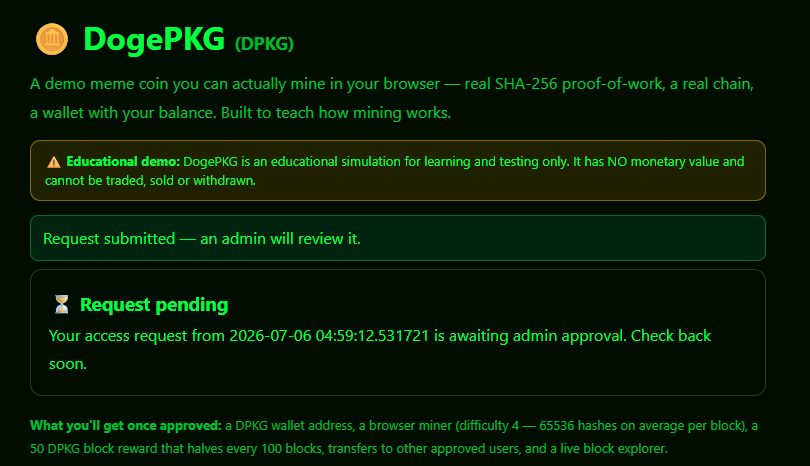
On the other side, admins get a 🪙 DogePKG Requests entry in the admin sidebar with approve, deny, and revoke — and revocation is enforced server-side on every endpoint, not just hidden in the UI.
Step 2 — Meet Your Wallet and the Rules
Once approved, revisiting the page drops you straight onto the miner. Three things to note before clicking anything:
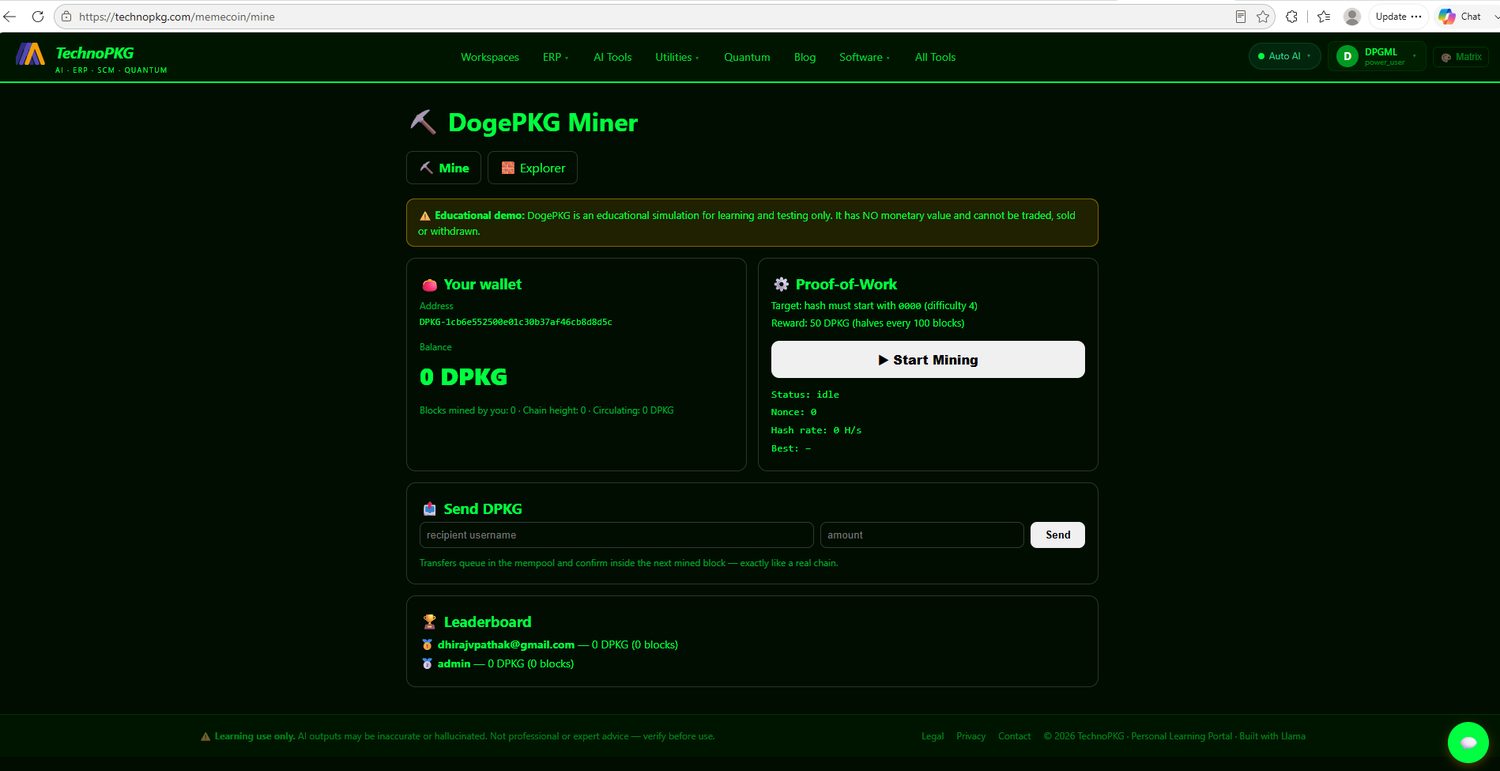
- Your address (
DPKG-…) is derived from your account — it's yours permanently. - The target: a block's hash must start with
0000(difficulty 4). Since each hex digit has 16 possibilities, that's one valid hash per 164 = 65,536 attempts on average. - The reward: 50 DPKG per block, halving every 100 blocks — block #101 pays 25.
Step 3 — Mine Your First Block
Click ▶ Start Mining. The browser fetches a mining job from the server — the next block's contents plus the hash of the current chain head — then does exactly what a real miner does: serialize the block canonically, hash it with SHA-256 (WebCrypto), check for the 0000 prefix, increment the nonce, repeat. Watch the nonce counter climb and the hash rate settle. Here's a session after ten blocks:
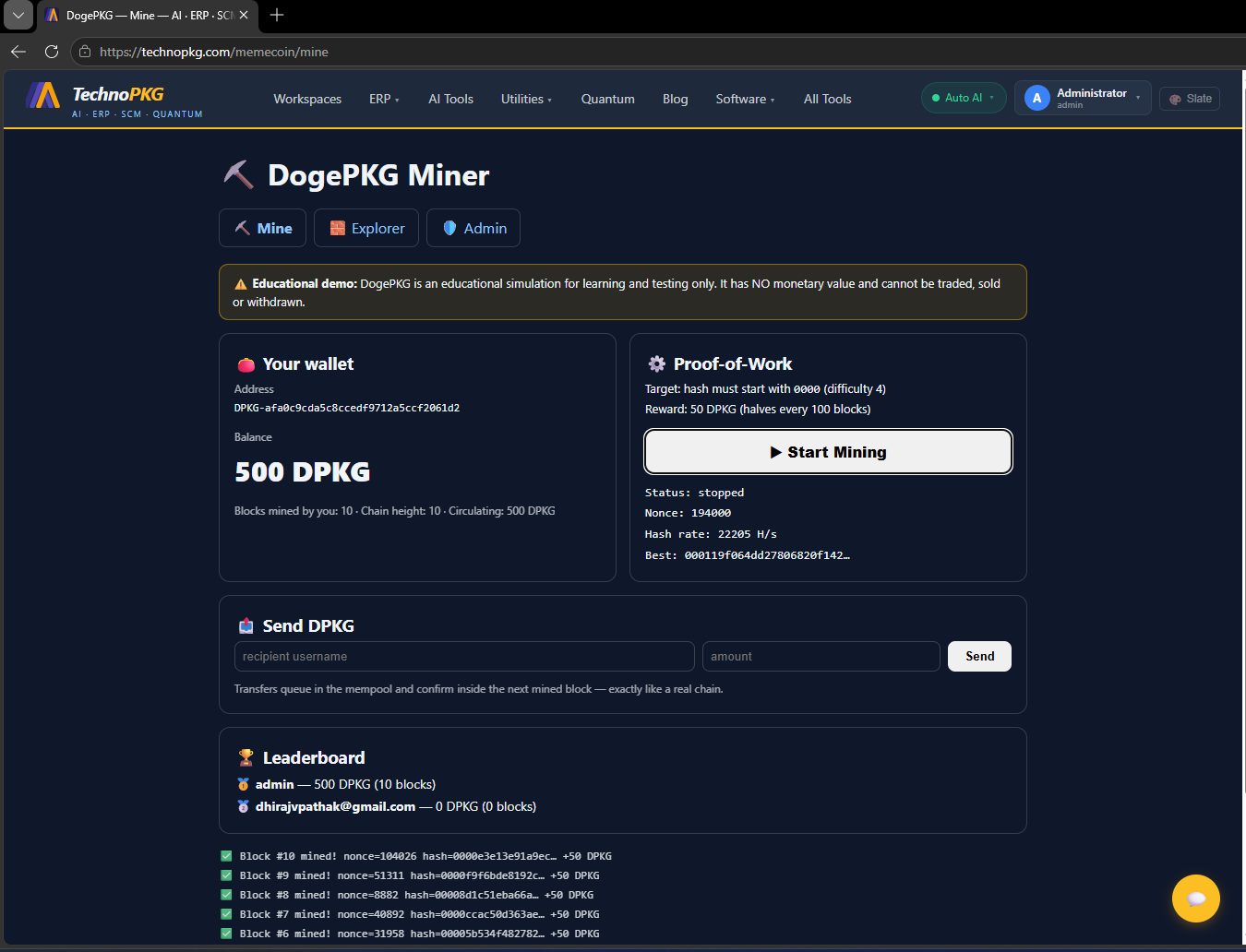
The block log is a little statistics lesson. Block #8 fell at nonce 8,882 (lucky); other attempts ground past 194,000 (unlucky). That variance is the point — proof-of-work is a lottery where hash rate buys tickets, and at 22,205 H/s this browser buys a winning ticket roughly every three seconds. Real Bitcoin mining is this exact game with about fifteen more zeros.
Step 4 — Understand Why the Server Checks Your Work
Finding the nonce is the browser's job; believing it is not. The submit endpoint recomputes the hash from the job it issued, checks the difficulty target, and confirms the block still extends the current chain head — only then does it append the block and credit the reward. Send a wrong nonce and you're rejected. And if someone else mined a block while you were working, your job is stale: the server refuses it and you fetch a new one, exactly like losing a block race on a real network. There's nothing to screenshot here — which is rather the point: the security step is invisible when it works.
Step 5 — Read the Chain in the Explorer
Open the 🧱 Explorer tab:
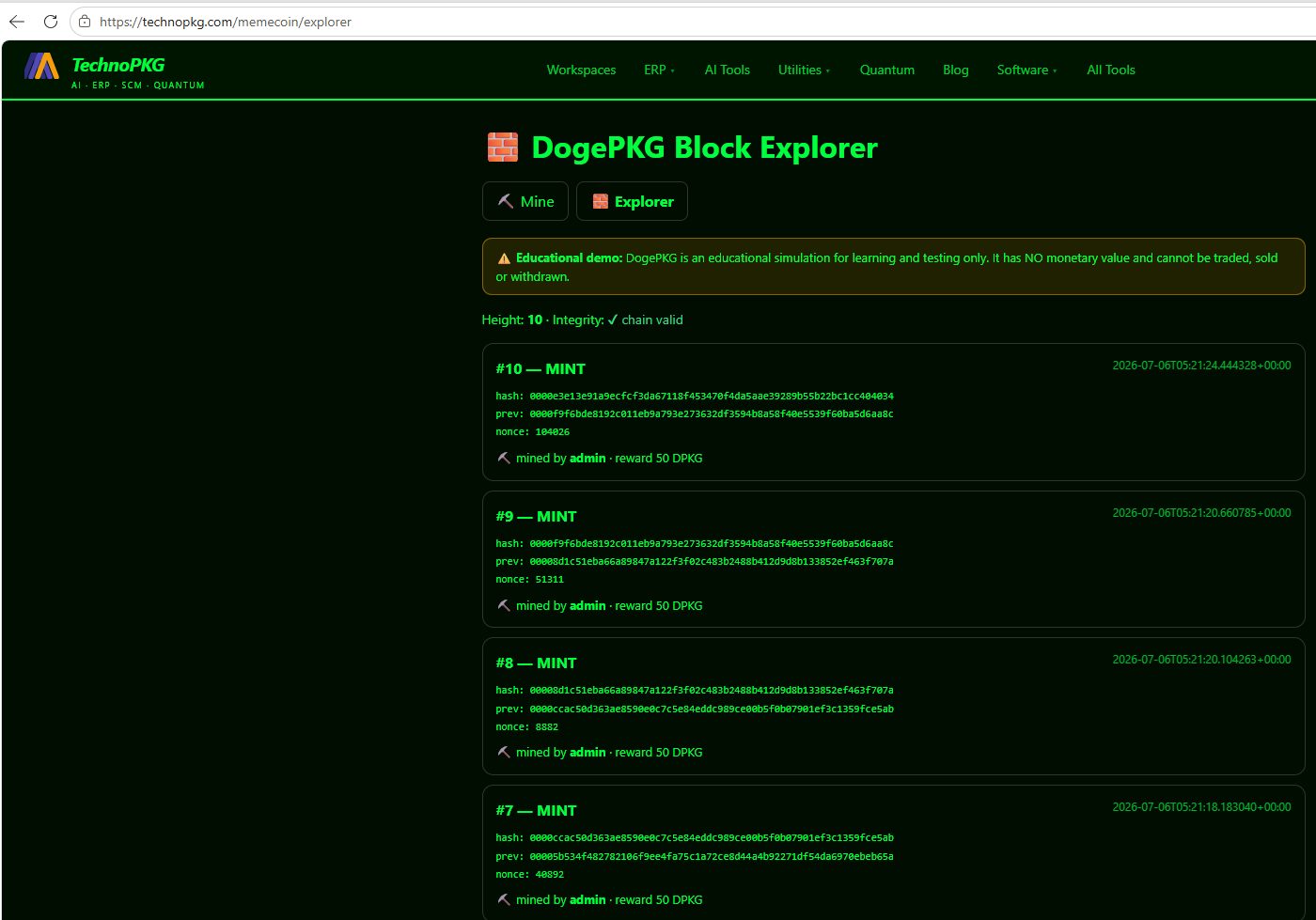
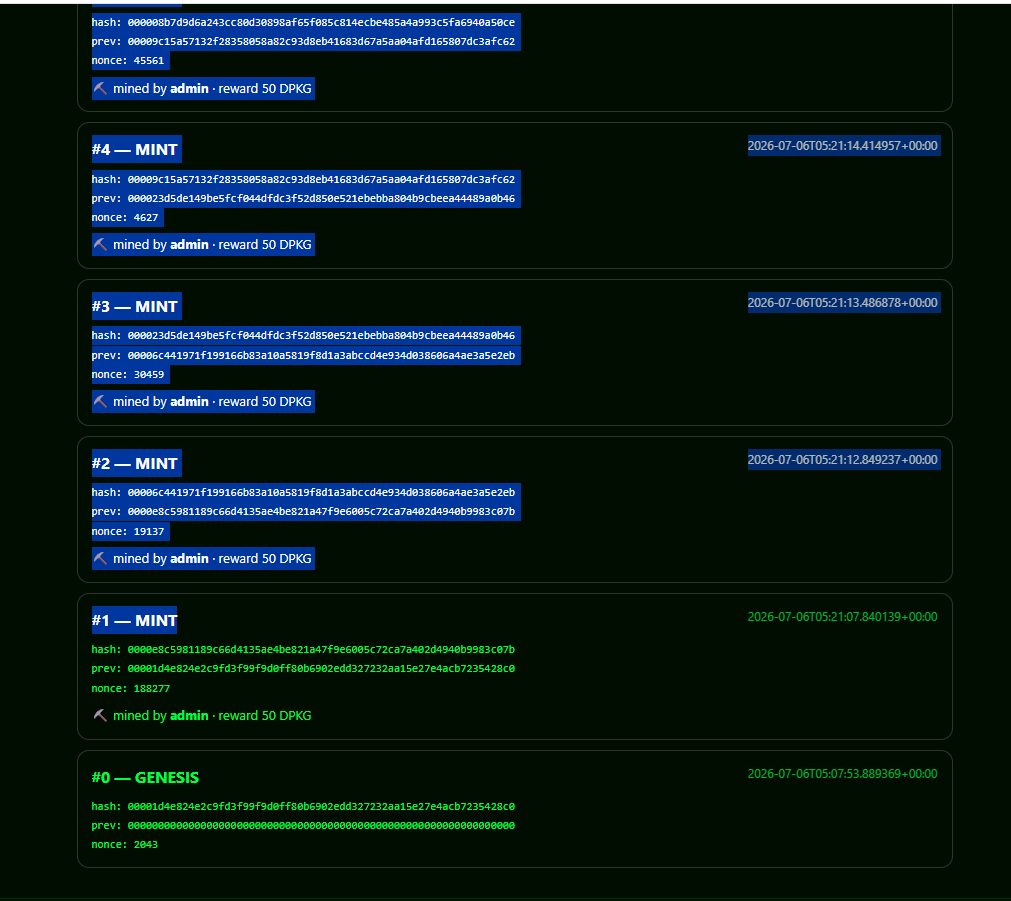
Now verify the chain by reading it: block #10's prev is exactly block #9's hash (0000f9f6bde8192c…); #9's prev is #8's hash (00008d1c51eba66a…); and so on down. Tamper with any historic block and its hash changes, breaking every link above it — the integrity check walks the whole chain on every load and would flag the exact block where it breaks. Scroll to the bottom for the origin:
Step 6 — Send DPKG to Another User
In the Send DPKG box, enter the recipient's portal username or email — the field autocompletes from approved wallet holders — and an amount. Two things happen instantly, and neither of them is "the coins arrive":
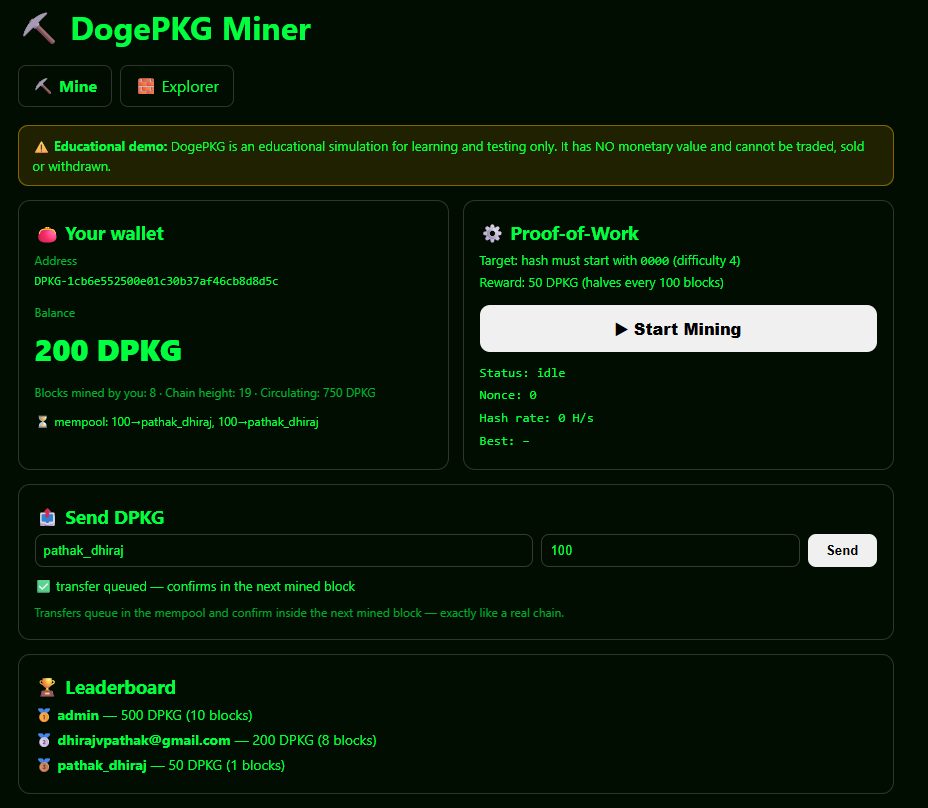
Notice a subtle accounting truth: circulating supply reads 750, not 950 — the escrowed 200 belongs to no wallet while it's in flight. Coins in the mempool are between owners, exactly as on a real chain.
Step 7 — Watch It from the Recipient's Side
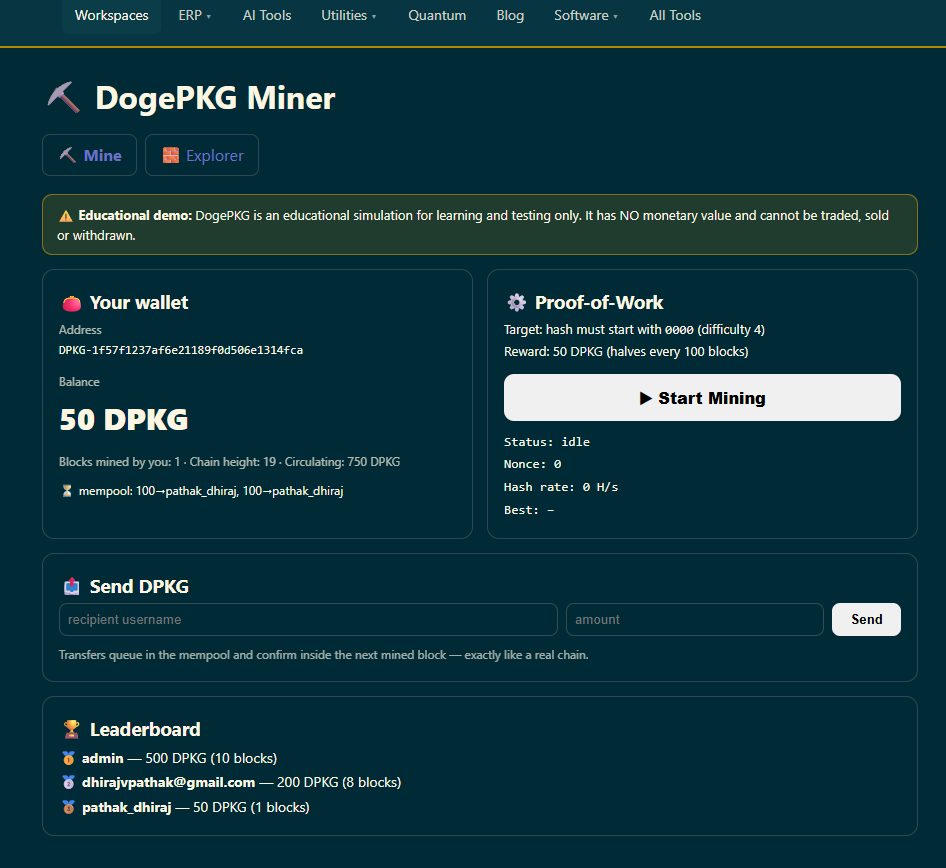
The recipient sees the same pending transfers on their own wallet card — promised, but not yet theirs:
Step 8 — Confirmation by Inclusion
The transfers settle only when the next block is mined, carrying them inside it. In this demo the recipient mined the block themselves — collecting the 50 DPKG reward plus both settled 100s in a single stroke, the mempool line vanishing, and the block in the explorer recording both transfers for anyone to audit. No block, no transfer. That single rule is most of what "confirmation" means in crypto, and here you can watch it happen in seconds instead of reading about it.
Under the Hood, Briefly
The coin reuses the portal's existing blockchain core (app/core/ledger.py) — the same canonical SHA-256 block hashing that powers the traceability ledger — so the browser's JavaScript hasher had to reproduce Python's json.dumps(sort_keys=True) serialization byte-for-byte, non-ASCII escapes and all, or no mined block would ever verify. The chain, wallets, and mempool live in a JSON store, and the whole thing — module, templates, gate, admin flow — is a single Flask blueprint.
Recap: the End-to-End Path
- Request access → admin approves (🪙 DogePKG Requests in the admin sidebar)
- Get a wallet, learn the target:
0000, ~65,536 hashes per block - Mine — watch the nonce lottery pay 50 DPKG a block
- Server verifies every nonce; stale jobs lose the race
- Read the explorer: every prev is the hash below it, down to genesis
- Send DPKG (username or email) — escrow + mempool, both wallets see it
- Next mined block carries the transfers — confirmation by inclusion
And once more for the record: it's a toy, on purpose. The value of DogePKG is exactly zero — except as the fastest way I know to feel how mining, chaining, and confirmation actually work.
Comments (0)